
Already deliver on Drive?
Connect Google Drive
Paste a shared folder link. Subfolders become albums and your originals never leave Drive.
- No re-upload
- Files stay in your Drive
- Refresh pulls new photos

Client galleries for photographers
Paste a Google Drive link — or upload photos straight to MoFrame — and send clients a real gallery in about a minute.

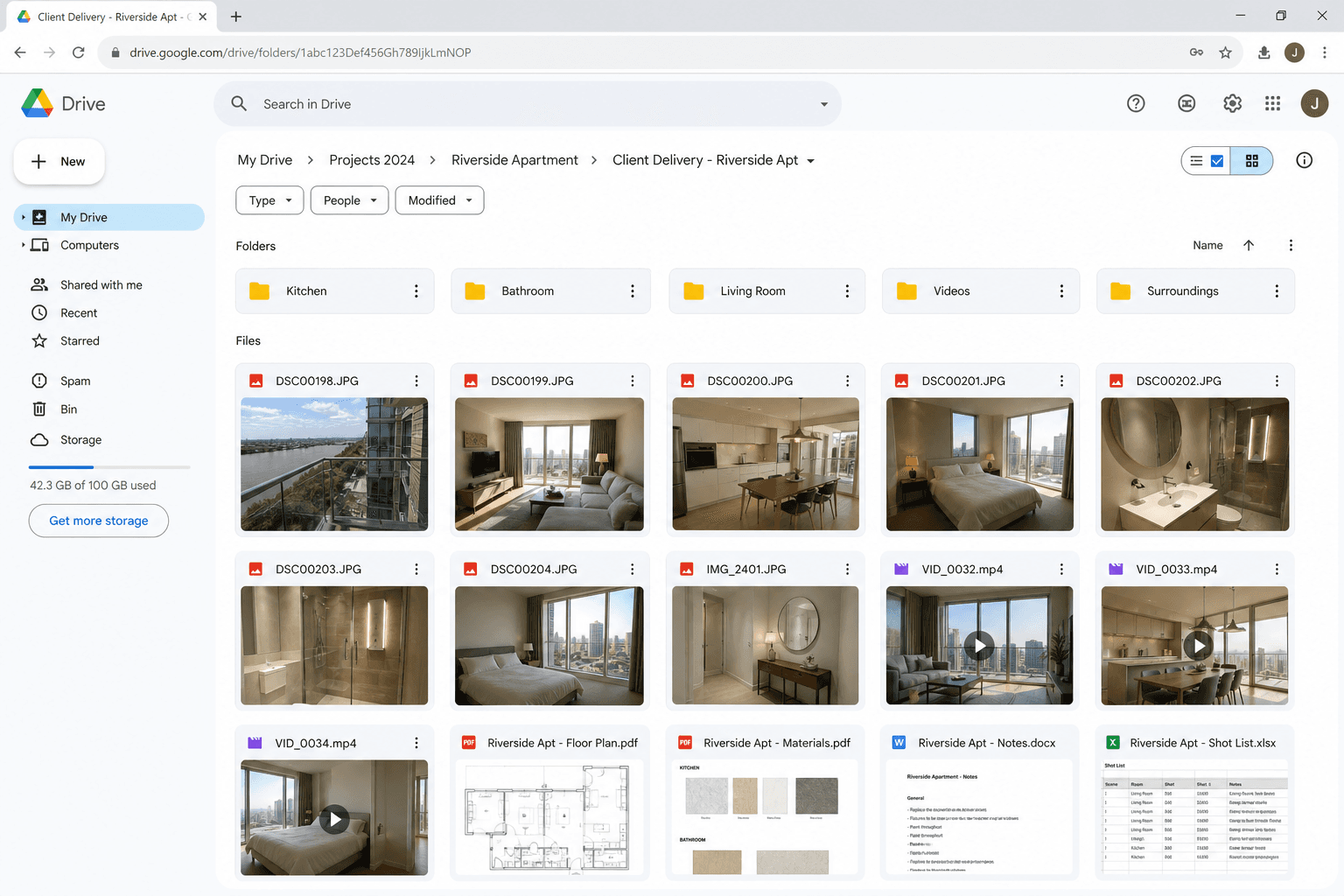
Drag to compare — a Drive folder vs what they should see






Two ways in
Both end the same way: a gallery link your client can open anywhere.
Paste a shared folder link. Subfolders become albums and your originals never leave Drive.
No Drive? Drag photos and videos straight in. We host them on fast storage built for galleries.
How it works
If you can share a link, you can use MoFrame.

01
Paste a shared Drive folder link, or drag files straight into MoFrame.
No Drive? No problem.

02
Albums build themselves from your folders. Add a cover, a PIN, an expiry — or don’t.
About a minute of work.

03
Copy the MoFrame link and send it on WhatsApp, email, or SMS.
PIN and expiry are optional.
What you get
Folder URL
Riverside Apartment
May 20, 2026
Why MoFrame
Kitchen, Balcony, Videos — each folder becomes a tab your client can actually browse.
Skip Drive entirely. Upload photos and video to MoFrame — 3 GB free, up to 1 TB on paid plans.
Hosted galleries download as a single ZIP — web size or originals, client’s choice.
Gate downloads. Collect the client’s email. Skip both if you don’t need them.
Kill the public link when the job is done. You stay in control.
See who took what, then export CSV. A shared folder will never tell you.
Drive vs MoFrame
What clients open
Google Drive share
A folder of files
MoFrame
A gallery with albums
Downloads
Google Drive share
Anyone with the folder link
MoFrame
Optional PIN or email
Whole-gallery ZIP
Google Drive share
Files one by one
MoFrame
One tap on hosted galleries
Who downloaded
Google Drive share
You don’t know
MoFrame
Activity log + CSV
When the job ends
Google Drive share
Link lives forever
MoFrame
Expiry or revoke
Your files
Google Drive share
Stay in Drive
MoFrame
Your call — Drive or hosted
Pricing
Every plan connects Drive folders and includes hosted storage for direct uploads. Free starts with 3 galleries and 3 GB.
Hosted galleries get faster previews and full ZIP downloads — on every plan, including free.
FAQ
Yes. Create a gallery and upload JPEG, PNG, or WebP photos and MP4 or MOV videos straight to MoFrame. The free plan includes 3 GB of hosted storage — no Google account involved.
About a minute from photos to something you can send a client.